grpc-web
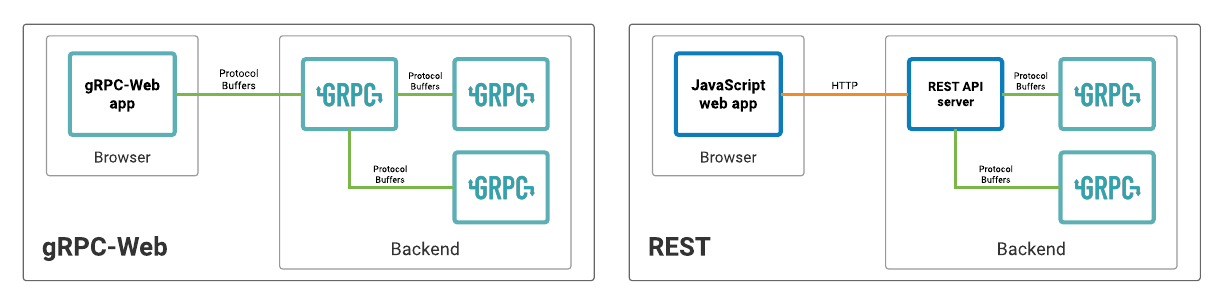
There are two choices for how to add gRPC-Web to an ASP.NET Core app:
- Support gRPC-Web alongside gRPC HTTP/2 in ASP.NET Core. This option uses middleware provided by the Grpc.AspNetCore.Web package.
- Use the Envoy proxy's gRPC-Web support to translate gRPC-Web to gRPC HTTP/2. The translated call is then forwarded onto the ASP.NET Core app.
There are pros and cons to each approach. If an app's environment is already using Envoy as a proxy, it might make sense to also use Envoy to provide gRPC-Web support. For a basic solution for gRPC-Web that only requires ASP.NET Core, Grpc.AspNetCore.Web is a good choice.
h
gRPC-web currently supports 2 RPC modes:
- Unary RPCs (example)
- Server-side Streaming RPCs (example) !Client-side and Bi-directional streaming is not currently supported (see streaming roadmap).
To enable gRPC-Web with an ASP.NET Core gRPC service:
- Add a reference to the
Grpc.AspNetCore.Webpackage. - Configure the app to use gRPC-Web by adding
UseGrpcWebandEnableGrpcWeb
   app.UseGrpcWeb(); // Must be added between UseRouting and UseEndpoints

    app.UseEndpoints(endpoints =>
    {
        endpoints.MapGrpcService<GreeterService>().EnableGrpcWeb();
    });
Alternatively, the gRPC-Web middleware can be configured so that all services support gRPC-Web by default and EnableGrpcWeb isn't required. Specify new GrpcWebOptions { DefaultEnabled = true } when the middleware is added.
app.UseGrpcWeb(new GrpcWebOptions { DefaultEnabled = true });
Consuming a gRPC-web
From a .net app
- Add a reference to the
Grpc.Net.Client.Webpackage. - Ensure the reference to
Grpc.Net.Clientpackage is version 2.29.0 or later. - Configure the channel to use the GrpcWebHandler:
var handler = new GrpcWebHandler(GrpcWebMode.GrpcWebText, new HttpClientHandler());
//var handler = new GrpcWebHandler(GrpcWebMode.GrpcWeb, new HttpClientHandler());


var channel = GrpcChannel.ForAddress("https://localhost:7226", new GrpcChannelOptions
{
    HttpClient = new HttpClient(handler)
});

var client = new SpeakerServiceDefinition.SpeakerServiceDefinitionClient(channel);
- The
GrpcWebMode.GrpcWebTextconfigures base64-encoded content. Required for server streaming calls in browsers. It will haveContent-Type : application/grpc-web-text - The
GrpcWebMode.GrpcWebconfigures sending content without encoding. Default value. It will haveContent-Type : application/grpc-web
Getting the data
try
{
    // Get all gRPC - web
    var speakers = client.GetAll(new Google.Protobuf.WellKnownTypes.Empty());
    await foreach (SpeakerResponse response in speakers.ResponseStream.ReadAllAsync())
    {
        Console.WriteLine($"{response.Id}");
    }
    Console.WriteLine("Found speakers with gRPC-Web");

}
catch (Grpc.Core.RpcException e)
{
    Console.WriteLine(e.Message);
}
Calling a gRPC-web from the Browser
- Add a Blazor Web Assembly project
- install: Grpc.Net.Client.Web
- add a connected service reference pointing to the .proto file. This will end-up installing the grpc client factory
- configure the gRPC client for the blazor app
var speakerAddress = "https://localhost:7226";
var speakers = new Uri(speakerAddress);

builder.Services
    .AddGrpcClient<SpeakerServiceDefinition.SpeakerServiceDefinitionClient>
    (o =>
    {
        o.Address = speakers;
    })
     .ConfigureChannel(o =>
     {
         o.HttpHandler = new GrpcWebHandler(GrpcWebMode.GrpcWebText, new HttpClientHandler());
     });
- inject the service in the
fetchdata.razor
@inject SpeakerServiceDefinition.SpeakerServiceDefinitionClient grpcClient


private List<SpeakerResponse> speakers = new List<SpeakerResponse>();

protected override async Task OnInitializedAsync()
    {
        using var call = grpcClient.GetAll(new Google.Protobuf.WellKnownTypes.Empty());
        await foreach (SpeakerResponse response in call.ResponseStream.ReadAllAsync())
        {
            speakers.Add(response);
        }

    }
- modify the table do display data:
<table class="table">
  <thead>
    <tr>
      <th>Id</th>
      <th>First Name</th>
      <th>Last Name</th>
      <th>Country</th>
    </tr>
  </thead>
  <tbody>
    @foreach (var speaker in speakers) {
    <tr>
      <td>@speaker.Id</td>
      <td>@speaker.FirstName</td>
      <td>@speaker.LastName</td>
      <td>@speaker.Country</td>
    </tr>
    }
  </tbody>
</table>
- Test the services
CORS
To allow a browser app to make cross-origin gRPC-Web calls, set up CORS in ASP.NET Core. Use the built-in CORS support, and expose gRPC-specific headers with WithExposedHeaders.
builder.Services.AddCors(o => o.AddPolicy("AllowAll", builder =>
    {
        builder.AllowAnyOrigin()
               .AllowAnyMethod()
               .AllowAnyHeader()
               .WithExposedHeaders("Grpc-Status", "Grpc-Message", "Grpc-Encoding", "Grpc-Accept-Encoding");
    }));
app.UseCors("AllowAll");
Practice
- Install Grpc.AspNetCore.Web
app.MapGet("/stream/speakers", async (ISpeakersService speakersService, IHttpContextAccessor accessor) =>
{
    async IAsyncEnumerable<CountryModel> StreamSpeakersAsync()
    {
        var speakers = await speakersService.GetAllAsync();
        foreach (var speaker in speakers)
        {
            await Task.Delay(500);
            yield return speaker;
        }
    }
    return StreamSpeakersAsync();
});